 7609df6747
* Rename landmark 5 variables

* Mark as NEXT

* Render tabs for multiple ui layout usage

* Allow many face detectors at once, Add face detector tweaks

* Remove face detector tweaks for now (kinda placebo)

* Fix lint issues

* Allow rendering the landmark-5 and landmark-5/68 via debugger

* Fix naming

* Convert face landmark based on confidence score

* Convert face landmark based on confidence score

* Add scrfd face detector model (#397)

* Add scrfd face detector model

* Switch to scrfd_2.5g.onnx model

* Just some renaming

* Downgrade OpenCV, Add SYSTEM_VERSION_COMPAT=0 for MacOS

* Improve naming

* prepare detect frame outside of semaphore

* Feat/process manager (#399)

* Minor naming

* Introduce process manager to start and stop

* Introduce process manager to start and stop

* Introduce process manager to start and stop

* Introduce process manager to start and stop

* Introduce process manager to start and stop

* Remove useless test for now

* Avoid useless variables

* Show stop once is_processing is True

* Allow to stop ffmpeg processing too

* Implement output image resolution (#403)

* Implement output image resolution

* Reorder code

* Simplify output logic and therefore fix bug

* Frame-enhancer-onnx (#404)

* changes

* changes

* changes

* changes

* add models

* update workflow

* Some cleanup

* Some cleanup

* Feat/frame enhancer polishing (#410)

* Some cleanup

* Polish the frame enhancer

* Frame Enhancer: Add more models, optimize processing

* Minor changes

* Improve readability of create_tile_frames and merge_tile_frames

* We don't have enough models yet

* Feat/face landmarker score (#413)

* Introduce face landmarker score

* Fix testing

* Fix testing

* Use release for score related sliders

* Reduce face landmark fallbacks

* Scores and landmarks in Face dict, Change color-theme in face debugger

* Scores and landmarks in Face dict, Change color-theme in face debugger

* Fix some naming

* Add 8K support (for whatever reasons)

* Fix testing

* Using get() for face.landmarks

* Introduce statistics

* More statistics

* Limit the histogram equalization

* Enable queue() for default layout

* Improve copy_image()

* Fix error when switching detector model

* Always set UI values with globals if possible

* Use different logic for output image and output video resolutions

* Enforce re-download if file size is off

* Remove unused method

* Remove unused method

* Remove unused warning filter

* Improved output path normalization (#419)

* Handle some exceptions

* Handle some exceptions

* Cleanup

* Prevent countless thread locks

* Listen to user feedback

* Fix webp edge case

* Feat/cuda device detection (#424)

* Introduce cuda device detection

* Introduce cuda device detection

* it's gtx

* Move logic to run_nvidia_smi()

* Finalize execution device naming

* Finalize execution device naming

* Merge execution_helper.py to execution.py

* Undo lowercase of values

* Undo lowercase of values

* Finalize naming

* Add missing entry to ini

* fix lip_syncer preview (#426)

* fix lip_syncer preview

* change

* Refresh preview on trim changes

* Cleanup frame enhancers and remove useless scale in merge_video() (#428)

* Keep lips over the whole video once lip syncer is enabled (#430)

* Keep lips over the whole video once lip syncer is enabled

* changes

* changes

* Fix spacing

* Use empty audio frame on silence

* Use empty audio frame on silence

* Fix ConfigParser encoding (#431)

facefusion.ini is UTF8 encoded but config.py doesn't specify encoding which results in corrupted entries when non english characters are used.

Affected entries:
source_paths
target_path
output_path

* Adjust spacing

* Improve the GTX 16 series detection

* Use general exception to catch ParseError

* Use general exception to catch ParseError

* Host frame enhancer models4

* Use latest onnxruntime

* Minor changes in benchmark UI

* Different approach to cancel ffmpeg process

* Add support for amd amf encoders (#433)

* Add amd_amf encoders

* remove -rc cqp from amf encoder parameters

* Improve terminal output, move success messages to debug mode

* Improve terminal output, move success messages to debug mode

* Minor update

* Minor update

* onnxruntime 1.17.1 matches cuda 12.2

* Feat/improved scaling (#435)

* Prevent useless temp upscaling, Show resolution and fps in terminal output

* Remove temp frame quality

* Remove temp frame quality

* Tiny cleanup

* Default back to png for temp frames, Remove pix_fmt from frame extraction due mjpeg error

* Fix inswapper fallback by onnxruntime

* Fix inswapper fallback by major onnxruntime

* Fix inswapper fallback by major onnxruntime

* Add testing for vision restrict methods

* Fix left / right face mask regions, add left-ear and right-ear

* Flip right and left again

* Undo ears - does not work with box mask

* Prepare next release

* Fix spacing

* 100% quality when using jpg for temp frames

* Use span_kendata_x4 as default as of speed

* benchmark optimal tile and pad

* Undo commented out code

* Add real_esrgan_x4_fp16 model

* Be strict when using many face detectors

---------

Co-authored-by: Harisreedhar <46858047+harisreedhar@users.noreply.github.com>
Co-authored-by: aldemoth <159712934+aldemoth@users.noreply.github.com>
109 lines
9.7 KiB
Markdown
109 lines
9.7 KiB
Markdown
FaceFusion
|
|
==========
|
|
|
|
> Next generation face swapper and enhancer.
|
|
|
|
[](https://github.com/facefusion/facefusion/actions?query=workflow:ci)
|
|

|
|
|
|
|
|
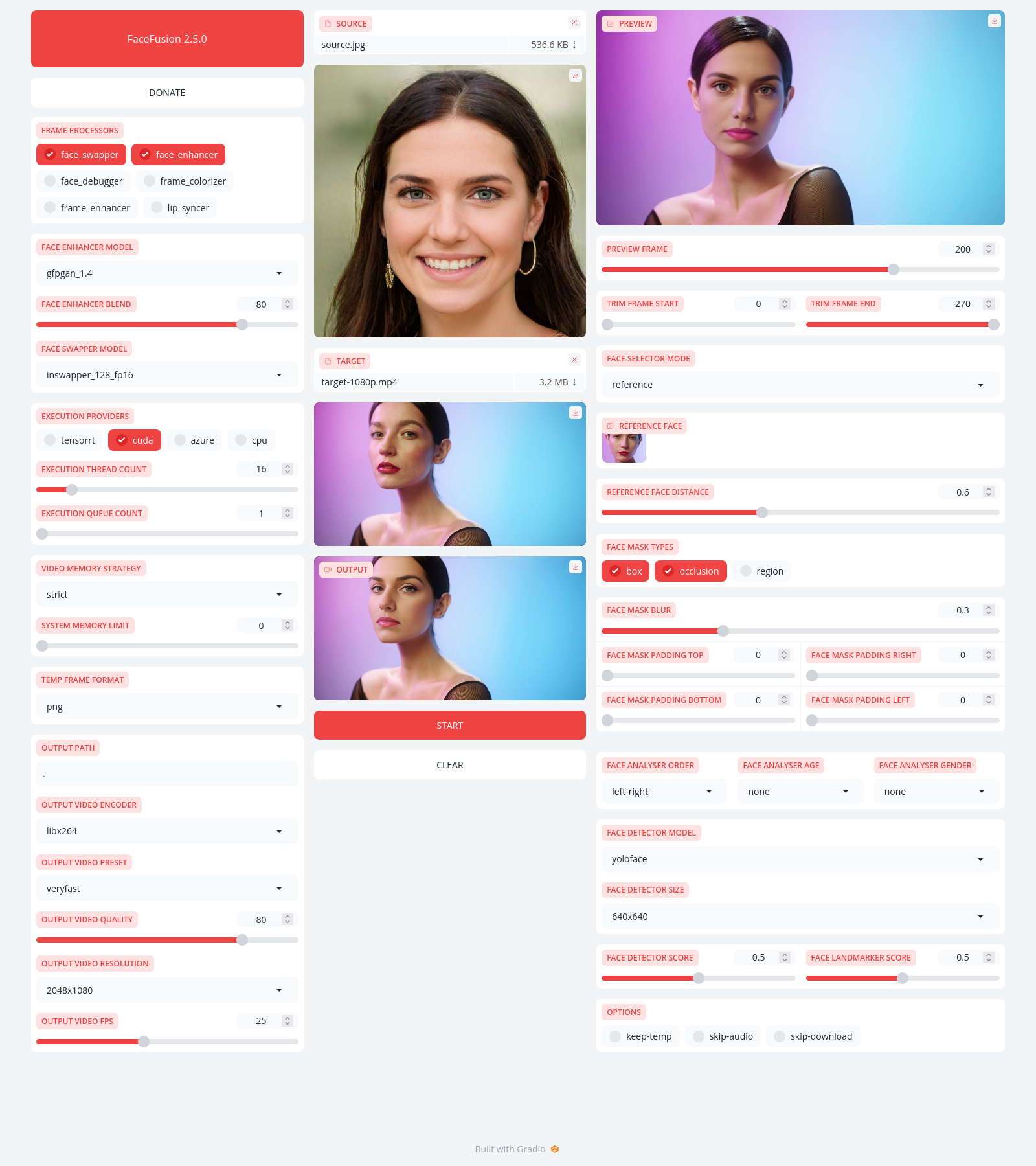
Preview
|
|
-------
|
|
|
|
|
|
|
|
|
|
Installation
|
|
------------
|
|
|
|
Be aware, the installation needs technical skills and is not for beginners. Please do not open platform and installation related issues on GitHub. We have a very helpful [Discord](https://join.facefusion.io) community that will guide you to complete the installation.
|
|
|
|
Get started with the [installation](https://docs.facefusion.io/installation) guide.
|
|
|
|
|
|
Usage
|
|
-----
|
|
|
|
Run the command:
|
|
|
|
```
|
|
python run.py [options]
|
|
|
|
options:
|
|
-h, --help show this help message and exit
|
|
-s SOURCE_PATHS, --source SOURCE_PATHS choose single or multiple source images or audios
|
|
-t TARGET_PATH, --target TARGET_PATH choose single target image or video
|
|
-o OUTPUT_PATH, --output OUTPUT_PATH specify the output file or directory
|
|
-v, --version show program's version number and exit
|
|
|
|
misc:
|
|
--skip-download omit automate downloads and remote lookups
|
|
--headless run the program without a user interface
|
|
--log-level {error,warn,info,debug} adjust the message severity displayed in the terminal
|
|
|
|
execution:
|
|
--execution-providers EXECUTION_PROVIDERS [EXECUTION_PROVIDERS ...] accelerate the model inference using different providers (choices: cpu, ...)
|
|
--execution-thread-count [1-128] specify the amount of parallel threads while processing
|
|
--execution-queue-count [1-32] specify the amount of frames each thread is processing
|
|
|
|
memory:
|
|
--video-memory-strategy {strict,moderate,tolerant} balance fast frame processing and low vram usage
|
|
--system-memory-limit [0-128] limit the available ram that can be used while processing
|
|
|
|
face analyser:
|
|
--face-analyser-order {left-right,right-left,top-bottom,bottom-top,small-large,large-small,best-worst,worst-best} specify the order in which the face analyser detects faces.
|
|
--face-analyser-age {child,teen,adult,senior} filter the detected faces based on their age
|
|
--face-analyser-gender {female,male} filter the detected faces based on their gender
|
|
--face-detector-model {many,retinaface,scrfd,yoloface,yunet} choose the model responsible for detecting the face
|
|
--face-detector-size FACE_DETECTOR_SIZE specify the size of the frame provided to the face detector
|
|
--face-detector-score [0.0-1.0] filter the detected faces base on the confidence score
|
|
--face-landmarker-score [0.0-1.0] filter the detected landmarks base on the confidence score
|
|
|
|
face selector:
|
|
--face-selector-mode {many,one,reference} use reference based tracking or simple matching
|
|
--reference-face-position REFERENCE_FACE_POSITION specify the position used to create the reference face
|
|
--reference-face-distance [0.0-1.5] specify the desired similarity between the reference face and target face
|
|
--reference-frame-number REFERENCE_FRAME_NUMBER specify the frame used to create the reference face
|
|
|
|
face mask:
|
|
--face-mask-types FACE_MASK_TYPES [FACE_MASK_TYPES ...] mix and match different face mask types (choices: box, occlusion, region)
|
|
--face-mask-blur [0.0-1.0] specify the degree of blur applied the box mask
|
|
--face-mask-padding FACE_MASK_PADDING [FACE_MASK_PADDING ...] apply top, right, bottom and left padding to the box mask
|
|
--face-mask-regions FACE_MASK_REGIONS [FACE_MASK_REGIONS ...] choose the facial features used for the region mask (choices: skin, left-eyebrow, right-eyebrow, left-eye, right-eye, eye-glasses, nose, mouth, upper-lip, lower-lip)
|
|
|
|
frame extraction:
|
|
--trim-frame-start TRIM_FRAME_START specify the the start frame of the target video
|
|
--trim-frame-end TRIM_FRAME_END specify the the end frame of the target video
|
|
--temp-frame-format {bmp,jpg,png} specify the temporary resources format
|
|
--keep-temp keep the temporary resources after processing
|
|
|
|
output creation:
|
|
--output-image-quality [0-100] specify the image quality which translates to the compression factor
|
|
--output-image-resolution OUTPUT_IMAGE_RESOLUTION specify the image output resolution based on the target image
|
|
--output-video-encoder {libx264,libx265,libvpx-vp9,h264_nvenc,hevc_nvenc,h264_amf,hevc_amf} specify the encoder use for the video compression
|
|
--output-video-preset {ultrafast,superfast,veryfast,faster,fast,medium,slow,slower,veryslow} balance fast video processing and video file size
|
|
--output-video-quality [0-100] specify the video quality which translates to the compression factor
|
|
--output-video-resolution OUTPUT_VIDEO_RESOLUTION specify the video output resolution based on the target video
|
|
--output-video-fps OUTPUT_VIDEO_FPS specify the video output fps based on the target video
|
|
--skip-audio omit the audio from the target video
|
|
|
|
frame processors:
|
|
--frame-processors FRAME_PROCESSORS [FRAME_PROCESSORS ...] load a single or multiple frame processors. (choices: face_debugger, face_enhancer, face_swapper, frame_enhancer, lip_syncer, ...)
|
|
--face-debugger-items FACE_DEBUGGER_ITEMS [FACE_DEBUGGER_ITEMS ...] load a single or multiple frame processors (choices: bounding-box, face-landmark-5, face-landmark-5/68, face-landmark-68, face-mask, face-detector-score, face-landmarker-score, age, gender)
|
|
--face-enhancer-model {codeformer,gfpgan_1.2,gfpgan_1.3,gfpgan_1.4,gpen_bfr_256,gpen_bfr_512,restoreformer_plus_plus} choose the model responsible for enhancing the face
|
|
--face-enhancer-blend [0-100] blend the enhanced into the previous face
|
|
--face-swapper-model {blendswap_256,inswapper_128,inswapper_128_fp16,simswap_256,simswap_512_unofficial,uniface_256} choose the model responsible for swapping the face
|
|
--frame-enhancer-model {lsdir_x4,nomos8k_sc_x4,real_esrgan_x4,span_kendata_x4} choose the model responsible for enhancing the frame
|
|
--frame-enhancer-blend [0-100] blend the enhanced into the previous frame
|
|
--lip-syncer-model {wav2lip_gan} choose the model responsible for syncing the lips
|
|
|
|
uis:
|
|
--ui-layouts UI_LAYOUTS [UI_LAYOUTS ...] launch a single or multiple UI layouts (choices: benchmark, default, webcam, ...)
|
|
```
|
|
|
|
|
|
Documentation
|
|
-------------
|
|
|
|
Read the [documentation](https://docs.facefusion.io) for a deep dive.
|